How to Choose a PoE Switch for IP Camera Systems
Choose a PoE switch for IP camera systems by matching ports, power budget, uplinks, cable runs and planned surveillance expansion.
By Maxsol Team

A suitable PoE switch for IP camera systems has enough powered ports for every camera, a PoE budget that covers their maximum combined demand, and uplinks that can carry footage back to the recorder or wider network. It should also suit the longest cable run, the site topology and the number of cameras likely to be added later.
Start with a camera schedule rather than choosing solely by switch port count. Record each camera’s maximum PoE requirement, location, cable route, network connection and any special operating conditions, such as infrared night mode, pan-tilt-zoom operation or external heaters. This makes it far easier to avoid power shortfalls and difficult upgrades after installation.
Start with camera count and topology
Count cameras by physical network location, not simply by the total required across the project. A single central communications cabinet may work for a compact building, while a larger premises may need switches distributed across several cabinets to keep copper cable runs practical.
For each location, calculate:
- Cameras connected directly to the local switch
- Spare PoE ports for planned cameras, replacements or temporary coverage
- Non-camera PoE devices, if any, sharing that switch
- Uplink connections required to the NVR, core switch or network cabinet
- Whether copper or fibre is the appropriate uplink medium
- The route and length of every horizontal cable run
A switch with exactly the same number of PoE ports as cameras leaves no operational flexibility. Where the design is likely to grow, specify spare ports at the relevant cabinet rather than assuming a camera can be connected to any switch elsewhere on site.
Match switch size to the local camera group
An eight-port PoE switch can suit a small entrance, outbuilding, retail area or isolated camera cluster. For example, the PS1802G 8-port Gigabit PoE switch with a 120W budget provides eight Gigabit PoE ports and two Gigabit RJ45 uplinks.
A 16-port switch is often a practical size for a medium camera zone, provided both its port count and total power budget fit the camera schedule. The PS11602G 16-port Gigabit PoE switch with a 300W internal power supply has 16 Gigabit PoE ports and two Gigabit uplinks.
For a larger cabinet serving multiple areas, 24- and 48-port designs can reduce the number of separate switches and simplify aggregation. That is not automatically the right approach, however. A distributed layout can be preferable where cable distances, building separation, resilience requirements or containment routes make a centralised design unsuitable.
Draw the traffic path before selecting uplinks
Every camera feed must travel from its PoE port to recording, monitoring or both. Map that route before selecting a switch:
- Camera to PoE switch: normally over copper Ethernet cable.
- PoE switch to NVR or core network: via an RJ45 or SFP uplink, depending on the design.
- NVR to viewing workstations or remote access infrastructure: outside the camera access-switch decision, but still relevant to total network capacity.
Do not confuse the number of camera ports with the number of uplinks. A switch with many PoE ports still needs an appropriate connection back to the rest of the surveillance network.
Calculate the PoE load
The PoE budget is the total power a switch can allocate across all powered ports. It is not the same as the power available to every port simultaneously. For a reliable surveillance design, add the maximum specified power draw of each connected camera, then compare the total with the switch’s available PoE budget.
Use this basic calculation:
Total PoE requirement = sum of each camera’s maximum input power + other PoE device loads
Use the maximum stated input power from the camera manufacturer’s documentation. Do not rely only on a typical daytime consumption figure. A camera may draw more power when infrared illumination activates, motors move, a heater operates or an onboard accessory is in use.
A practical PoE budget example
Imagine a switch serving:
- Eight fixed cameras rated at 8W maximum each
- Two varifocal or PTZ cameras rated at 20W maximum each
The calculation is:
(8 × 8W) + (2 × 20W) = 104W
A 120W PoE budget may appear sufficient for that specific load, but the remaining margin is small. Before using it, account for any additional powered device, planned camera, camera accessory or unusual operating condition. If the design needs room to expand, a higher-budget or additional switch may be the safer choice.
The important principle is simple: select on maximum simultaneous load, then retain a defined power margin appropriate to the project. The required margin depends on the camera mix and how much future capacity the site needs.
Check both the total budget and port-level demand
Two checks are required:
- Total PoE budget: Can the switch power all connected devices at their maximum combined demand?
- Per-port power: Can an individual PoE port supply the requirement of the highest-power camera?
For example, the PS12402FG has a 300W PoE budget and supports up to 30W per PoE port. This can be relevant where the schedule includes cameras with higher individual demand, but you must still verify each camera’s PoE standard, maximum power requirement and compatibility before specifying it.
Avoid assuming that a switch’s overall budget tells you the permitted power on every port. Conversely, a high per-port figure does not mean the full amount can be supplied on every port at once; the total budget remains the limiting figure.
Common PoE sizing mistakes
The most frequent power-planning errors are:
- Adding up typical rather than maximum camera consumption
- Forgetting infrared, heaters, wipers, PTZ movement or accessories
- Allowing no capacity for a later camera
- Treating a switch’s total budget as a per-port rating
- Combining different camera types without checking their individual power needs
- Failing to review what happens when all cameras enter night mode together
A clearly documented power schedule is useful during procurement, commissioning and future maintenance.
Choose copper and SFP uplinks
Uplinks connect the PoE access switch to the NVR, a core switch or another network segment. Choose the uplink type around distance, pathway, electrical environment and the equipment at the far end.
RJ45 uplinks for local copper connections
Gigabit RJ45 uplinks are convenient where the recorder, router or aggregation switch is nearby and a compliant copper channel is practical. They can simplify installations within the same cabinet or building area.
The PS1802G includes two Gigabit RJ45 uplinks. The PS11602G also includes two Gigabit uplinks; confirm the product documentation and the intended connected equipment when finalising an installation design.
When using copper for uplinks, consider the total channel length, patch leads, routing and electromagnetic environment. Maintain appropriate separation from power cabling and follow cable-system installation practice. An uplink is a critical path: a poorly installed cable may affect every camera connected to that switch.
SFP uplinks for fibre-based aggregation
SFP uplinks are useful where an access switch needs a fibre connection to a central cabinet, especially across longer building links or where electrical separation is required. Fibre can also be a better fit for external links when appropriately designed and protected for the environment.
The PS12402FG 24-port Gigabit PoE switch with RJ45 and SFP uplinks provides 24 Gigabit PoE ports, two Gigabit RJ45 uplinks and two Gigabit SFP uplinks. This gives a designer options for local copper aggregation and fibre-oriented connections.
For high camera counts, the PS14802SFG 48-port Gigabit PoE switch with Gigabit SFP uplinks has 48 Gigabit PoE ports, two Gigabit SFP uplinks, a 400W PoE budget and 100Gbps switching capacity.
Before choosing an SFP-based link, confirm:
- The fibre type already installed or proposed
- Required connector type and optical module compatibility
- Link distance and optical budget
- Whether the connected core equipment has matching ports and compatible modules
- The enclosure, earthing and protection arrangements for outdoor or inter-building routes
Consider bandwidth, not only physical port type
A Gigabit uplink can be suitable for many camera groups, but suitability depends on the combined bitrate of all cameras and other traffic using the same connection. Add the intended camera bitrates, allowing for recording settings, scene complexity and any non-surveillance network traffic that shares the uplink.
Do not select an uplink based only on camera resolution. Bitrate is affected by codec, frame rate, image complexity, variable bitrate behaviour and event settings. Obtain the camera manufacturer’s expected bitrate range and design around the operational recording profile.
Decide whether 300m Extend mode is needed
Standard Ethernet copper channel planning is commonly based around a 100-metre maximum channel. When a camera is beyond that practical distance from the switch, the choice is not automatically to use an extended-distance mode. First assess whether a nearer cabinet, fibre link, wireless bridge or a revised topology would produce a more maintainable result.
Extend mode can be useful for selected long camera runs, but it is a design decision with trade-offs. Extended transmission modes may operate at reduced data rates compared with normal Gigabit connections, so the available bandwidth must be checked against the camera’s actual traffic requirement.
The PS1802G lists a 300m Extend mode. Its suitability for a particular long run depends on the cable, route, camera bitrate, environmental conditions and installation quality. Confirm the operating conditions and performance expectations in the relevant product documentation before relying on it for a critical camera.
The PS11602G also lists Extend mode. Do not assume that every switch’s Extend mode has identical distance, speed or cable requirements. Verify the specific product capability and test the complete link during commissioning.
When Extend mode may be appropriate
Consider an extend function when:
- A single camera is located beyond a conventional copper channel distance
- The camera’s required bandwidth remains within the extended-mode link capability
- A local powered cabinet is impractical
- The cable route and environmental protection have been properly assessed
- The system can be fully tested in the intended day and night operating conditions
When another topology may be better
A different design may be preferable where:
- Several cameras are beyond normal copper distance
- The remote location requires multiple network services
- High-bitrate cameras need more uplink bandwidth
- The route crosses between buildings or exposed outdoor areas
- Future expansion is likely
- The site needs strong electrical separation or a more serviceable network layout
For these cases, fibre to a remote cabinet or another carefully planned distribution method can offer a clearer long-term structure. The correct decision is site-specific; extended copper is a tool, not a universal replacement for sound topology planning.
Compare the approved 8-, 16-, 24- and 48-port models
The following comparison uses the stated product context only. Port count and PoE budget are starting points, not complete compatibility confirmation. Review camera demand, uplink design, management requirements and installation conditions before selecting any model.
| Model | PoE ports | Uplinks | Stated PoE budget | Relevant stated features |
|---|---|---|---|---|
| PS1802G | 8 Gigabit PoE | 2 Gigabit RJ45 | 120W | 300m Extend mode, VLAN isolation, AI PoE watchdog |
| PS11602G | 16 Gigabit PoE | 2 Gigabit | 300W internal power supply | Watchdog, VLAN and Extend modes |
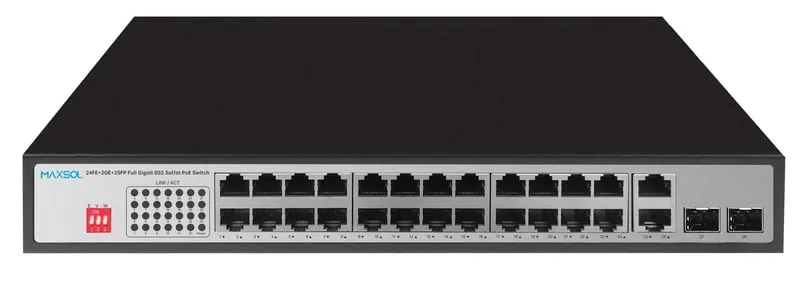
| PS12402FG | 24 Gigabit PoE | 2 Gigabit RJ45, 2 Gigabit SFP | 300W | Up to 30W per PoE port |
| PS14802SFG | 48 Gigabit PoE | 2 Gigabit SFP | 400W | 100Gbps switching capacity |
PS1802G: smaller camera groups and long-run considerations
The PS1802G is relevant where eight PoE camera ports and two Gigabit RJ45 uplinks meet the local topology. Its stated 120W PoE budget must cover the maximum combined draw of the connected devices.
VLAN isolation may be useful in a surveillance layout where camera ports should be separated from one another at the switch level, subject to the overall network design. The stated AI PoE watchdog is also relevant to installers considering automatic camera-port recovery functions. Confirm how these functions are configured and behave in the proposed deployment before relying on them operationally.
PS11602G: medium camera zones with higher stated power capacity
With 16 Gigabit PoE ports and a 300W internal power supply, the PS11602G may suit a medium-sized camera cluster with a more demanding combined PoE schedule than a small eight-port deployment.
Its watchdog, VLAN and Extend modes may be useful features, but they should not be treated as a substitute for network design, correct cabling or camera compatibility checks. Establish the required isolation behaviour, link distance and bandwidth expectations before commissioning.
PS12402FG: 24 cameras with copper and fibre uplink options
The PS12402FG is relevant where up to 24 local PoE ports are needed and the network design benefits from both RJ45 and SFP uplink options. Its stated 300W budget and up-to-30W per-port power figure should be checked against the complete camera schedule.
It may be a sensible comparison point for a central cabinet serving several nearby camera zones, particularly where a fibre connection to a core network is planned. However, the 24-port count alone should not dictate the design: ensure its total budget still accommodates all camera maximum loads.
PS14802SFG: dense camera deployments
The PS14802SFG provides 48 Gigabit PoE ports, a 400W PoE budget, two Gigabit SFP uplinks and 100Gbps switching capacity. It is therefore a model to assess for a dense camera deployment or a larger aggregation cabinet.
A 48-port switch does not necessarily support 48 high-power cameras at their maximum demand simultaneously. Divide the 400W budget across the actual camera load and leave appropriate capacity for the operating scenario. Also assess whether two Gigabit SFP uplinks fit the recording network’s physical design and aggregate bandwidth requirements.
Management needs: specify the operational controls you require
A surveillance switch may be selected for basic power and connectivity, but larger or more sensitive systems often need defined network controls. Write down those requirements before comparing products.
Potential requirements can include:
- Separate camera and business-network traffic
- VLAN configuration and uplink behaviour
- Monitoring of port status and PoE consumption
- Remote restart or recovery of individual camera ports
- Loop protection and broadcast control
- Network documentation, addressing and change management
- Fault diagnosis from a central location
VLAN isolation and watchdog features are stated for certain models above, but do not assume this establishes the full set of functions expected from a managed switch. If the project requires specific configuration, monitoring, protocol support or remote administration, obtain and verify the relevant product documentation before purchase and deployment.
For a straightforward standalone camera segment, a simpler feature set may be adequate. For sites with multiple cabinets, shared corporate infrastructure or strict operating procedures, management capability can be as important as port count and PoE budget.
Plan expansion without oversizing blindly
Allowing for future cameras is sensible, but buying the largest possible switch is not always the best outcome. Expansion planning should reflect the likely physical location of new cameras, available cable routes, expected power demand and available uplink capacity.
Ask these questions:
- Where are the next cameras most likely to be installed?
- Are spare ports needed in the same cabinet, or at a remote point?
- Will future cameras require more power than the initial set?
- Does the uplink have capacity for the additional video traffic?
- Is there room in the enclosure for a larger switch, fibre termination and cable management?
- Can the site power system support the planned switch load?
A spare PoE port is useful only if it is in the right location and has adequate available PoE budget. Keep an updated port map and power schedule after every change.
Final deployment checklist
Use this checklist before ordering or installing a PoE switch for IP camera systems:
- Count cameras per switch location, not only across the whole site.
- Allow spare ports where expansion or service replacement is expected.
- Record every camera’s maximum PoE demand, including night and accessory loads.
- Check total maximum demand against the switch’s stated PoE budget.
- Check the highest-demand camera against the available per-port power capability.
- Confirm the camera PoE standard and electrical compatibility.
- Map every camera-to-switch cable route and verify cable length and installation quality.
- Use Extend mode only after checking its stated distance, bandwidth and cable conditions.
- Size uplinks around aggregate camera bitrate, recorder location and future traffic.
- Select RJ45 or SFP uplinks to suit the physical route and connected equipment.
- Confirm compatible fibre, optical modules and termination details where SFP is used.
- Define whether VLAN isolation, watchdog recovery, monitoring or remote configuration is required.
- Review enclosure space, cooling, mains supply, earthing and protection appropriate to the installation environment.
- Label ports, cameras, uplinks and cable routes for commissioning and future support.
- Test live video, recording, night operation and recovery behaviour after installation.
The best PoE switch is the one that matches the camera count at each location, maximum power load, cable-distance plan, uplink medium and operational requirements. Compare the linked Maxsol models against your own port count, load schedule, distance, power environment and management needs before making a final specification.