SFP Uplink PoE Switch Guide for CCTV Fibre Networks
Choose an SFP uplink PoE switch for CCTV with practical guidance on fibre backhaul, topology, transceiver checks, port layouts and deployment planning.
By Maxsol Team

An SFP uplink PoE switch for CCTV is useful when cameras are powered locally over Ethernet but the connection back to the recorder, core switch or control room needs to travel over fibre. The SFP slot accepts a compatible fibre transceiver, allowing the switch to form an optical backhaul rather than relying on a long copper uplink.
The right choice depends on more than the number of camera ports. Plan the route and topology first, then confirm the uplink count, available bandwidth, PoE budget, fibre type, connector format and the transceivers required at both ends. An SFP slot alone does not guarantee that a particular module or fibre link will work.
What an SFP uplink does
An SFP uplink is a removable optical interface on a network switch. Rather than connecting a copper Ethernet lead to the uplink, the installer fits an SFP transceiver and connects fibre patch leads or an appropriately terminated fibre run. The switch can then send aggregated camera traffic to another switch, a network video recorder (NVR) network, or a central equipment cabinet.
In a CCTV installation, PoE access ports and SFP uplinks serve different jobs:
- PoE ports provide network connectivity and electrical power to IP cameras over copper Ethernet cabling.
- SFP uplinks carry the combined network traffic from multiple cameras over fibre.
- Copper uplinks can connect local equipment where a copper link is practical, such as an NVR in the same cabinet.
- The receiving device must have a compatible optical interface or a suitable media conversion arrangement.
Fibre is normally considered where a camera cluster sits in a separate building, at a gatehouse, across a large site or at an outdoor cabinet that is impractical to link by conventional copper Ethernet. It also helps keep the powered camera runs local to the access switch while separating the backhaul path from the PoE cabling.
An SFP uplink does not power cameras at the remote end. The PoE switch still requires its own correctly designed power source, and the cameras need to remain within the copper Ethernet and PoE constraints specified for the selected equipment and installation method.
Why removable SFP modules matter
The SFP transceiver is separate from the switch. That flexibility can be useful, but it shifts an important part of the design to the specification stage. The selected module must align with the switch port, the module at the far end and the installed fibre infrastructure.
Before ordering, check the switch documentation and module documentation rather than assuming that all physically similar SFPs are interchangeable. The slot, Ethernet speed, optical interface, fibre type, wavelength approach, connector, fibre count and intended link length all need to form a matched system.
Copper versus fibre backhaul
Copper Ethernet is straightforward and often economical for short, sheltered connections within a building or cabinet. Fibre becomes the more appropriate backhaul option when the route, site layout or electrical environment makes copper less suitable.
| Consideration | Copper uplink | Fibre SFP uplink |
|---|---|---|
| Physical medium | Twisted-pair Ethernet cable | Fibre cable plus transceivers and patching |
| Typical use | Nearby NVR, router or switch | Remote building, perimeter cabinet or distributed camera zone |
| Electrical connection between locations | Creates a conductive path | Uses a non-conductive optical path |
| Installation focus | Cable quality, terminations and Ethernet channel limits | Fibre type, splice or termination quality, patching and transceiver matching |
| Future changes | May require replacing cable for a different link design | May allow optical modules to be selected around a designed fibre infrastructure |
| Main planning risk | Treating a long cable route as an ordinary Ethernet patch lead | Buying modules before checking fibre and far-end compatibility |
For CCTV, fibre is not automatically necessary simply because a site is large. A well-designed copper connection may be appropriate for equipment housed together. Conversely, a small remote gate or car park cabinet may justify fibre because the physical route is separate from the main building.
The backhaul also has to carry the traffic from every camera connected downstream. Consider normal viewing, recording, multi-user viewing, motion-event peaks, camera configuration traffic and any additional devices sharing the same switch. Camera resolution alone does not define bandwidth; codec settings, frame rate, scene complexity and recording configuration all affect it.
Do not confuse camera reach with backhaul reach
A frequent design mistake is to focus on the fibre route and overlook the copper runs from the switch to each camera. The fibre link joins network locations; it does not extend PoE from the switch directly through the fibre to a camera.
Where a design includes longer copper camera runs, check the specific switch mode, port capability, camera power draw and network performance implications. A long-range mode may be useful in some layouts, but it should be selected according to the documented product behaviour and the requirements of the individual camera link, not treated as a substitute for site-wide cable planning.
Count uplinks and plan topology
Start by drawing the physical network, not by choosing a switch from its front-panel port count. Mark the camera groups, equipment cabinets, NVR or VMS location, control-room network, fibre termination points and each potential route between them.
For a simple star arrangement, each remote PoE switch usually needs one uplink back to the central network. A switch with two SFP uplinks can offer extra topology flexibility, for example where separate optical connections are required by the network design. However, a second physical uplink should not be assumed to provide automatic resilience, aggregation or loop protection unless the relevant switch and wider network features have been confirmed.
A practical topology process
- Group cameras by location. Separate cameras by building, entrance, yard, warehouse zone or outdoor cabinet.
- Place the access switch close to its camera group. This keeps copper PoE runs manageable and concentrates the fibre backhaul at a sensible point.
- Identify the aggregation point. This may be an NVR cabinet, a core switch or a dedicated surveillance network cabinet.
- Count each required connection. Include the primary backhaul, local recorder or router connection, wireless bridge, maintenance device and any planned expansion.
- Check traffic direction. Most camera traffic flows towards recording and monitoring equipment, so avoid creating a shared uplink bottleneck for too many cameras.
- Define the resilience requirement. If the project requires dual paths, document how the network will prevent loops and what occurs when a link fails.
- Leave sensible capacity. Spare camera ports are useful, but spare uplink capacity and cable pathways also matter.
A common small-site layout is a PoE switch in each remote cabinet, with one fibre uplink from each cabinet to a central aggregation switch. A larger site may use intermediate aggregation points. In either case, ensure every downstream camera group has a clear, documented path to recording equipment.
Uplink count is not the same as camera-port count
An eight-port switch with two SFP uplinks may suit a compact camera cluster that needs optical connectivity and a separate uplink option. A 16- or 24-port access switch can better suit larger groups, but its traffic still converges on the available uplink path.
The design question is therefore: How many devices need connections at this location, and how much combined traffic must leave this switch at the same time? Answer both before comparing products.
Confirm module, fibre and distance compatibility
Treat the optical link as a complete chain. The switch, SFP module, fibre cable, patch leads, panels, connectors and far-end transceiver must be selected together. The fibre route can be physically sound yet fail to link if one part of that chain is mismatched.
Confirm the following details in writing before purchase or installation:
- SFP port speed: Check the Ethernet speed supported by the switch SFP port and the intended module.
- Transceiver type at both ends: The two modules must be designed to operate together over the selected fibre arrangement.
- Fibre type: Identify the installed fibre type from drawings, labels or test records. Do not select modules by connector appearance alone.
- Fibre count and link arrangement: Determine whether the design uses two fibres or a single-fibre approach, and match the module pair accordingly.
- Connector format: Confirm the connector interfaces on the transceivers and existing patch infrastructure.
- Module reach rating: Use the module manufacturer’s stated optical reach for the actual fibre type and link arrangement. Allow for the complete installed path, not merely a map measurement.
- Optical loss budget: For designed or critical links, account for fibre attenuation, splices, connectors, patch panels and installation condition against the module’s documented limits.
- Temperature and enclosure conditions: Check whether the module and switch are suitable for the actual cabinet environment.
- Interoperability policy: Where equipment comes from different suppliers, confirm supported module coding and interoperability before deployment.
Do not rely on a generic statement such as “single-mode is for long distance” or “multimode is for short distance” as a final specification. Those descriptions do not establish compatibility for a particular module pair, fibre route or installed loss budget.
Test the completed optical path
Where practical, test and label each fibre pair before the CCTV equipment is commissioned. Record which fibres connect to which cabinet, the transceiver identities, the switch port used and the far-end port. This makes fault finding far quicker than tracing a link after cameras have been installed.
If a fibre uplink does not establish, investigate systematically:
- Check that the switch port and inserted module are supported together.
- Confirm the far-end module is the correct matched type.
- Verify fibre pair routing and polarity.
- Inspect and clean optical connectors using appropriate procedures.
- Check patch leads, panel positions and splice records.
- Review the link and module status information available from the equipment.
- Test the cable path where the installation process permits.
Avoid looking into active fibre connectors or transceiver ports.
Compare practical switch layouts
The following layouts illustrate how port mix, PoE capacity and uplink format can influence a CCTV design. Verify the remaining installation, module and management requirements against the relevant product information before specifying a system.
| Switch layout | Camera-facing ports | Uplink arrangement | PoE specification | Suitable starting point for |
|---|---|---|---|---|
| PS1802SFG | 8 Gigabit PoE ports | 2 Gigabit SFP uplinks | 120W internal supply; IEEE 802.3af/at up to 30W per port | Smaller camera groups requiring two Gigabit SFP uplinks |
| PS11602FE | 16 Fast Ethernet PoE ports | 2 Gigabit copper plus 1 Gigabit SFP uplink | 200W budget | Medium camera groups with a fibre backhaul and local copper uplink needs |
| PS12402FE | 24 Fast Ethernet PoE ports | 2 Gigabit copper plus 1 Gigabit SFP uplink | 300W budget | Larger camera groups where port count and PoE budget need careful planning |
For a smaller CCTV edge cabinet, the PS1802SFG eight-port Gigabit PoE switch with two SFP uplinks provides eight Gigabit PoE ports and two Gigabit SFP uplinks. It has a 120W internal supply, supports IEEE 802.3af/at up to 30W per port, and includes VLAN, watchdog and Extend mode. The total PoE load must still be calculated across all connected cameras; “up to 30W per port” is not a statement that eight devices can each receive that amount simultaneously from a 120W supply.
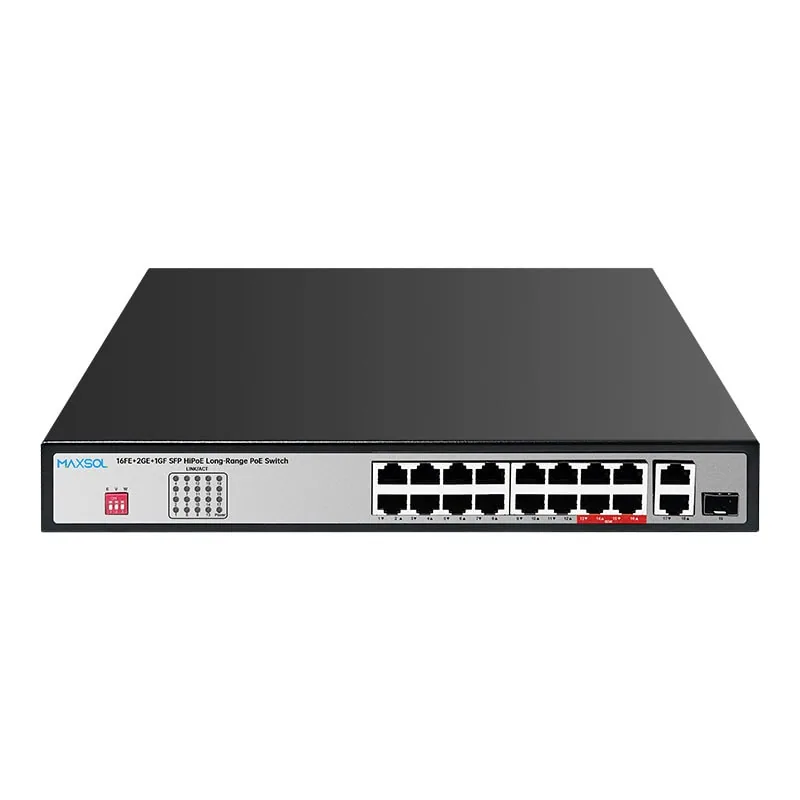
Where a design needs more camera-facing ports, the PS11602FE 16-port PoE switch with Gigabit SFP uplink has 16 Fast Ethernet PoE ports, two Gigabit copper uplinks, one Gigabit SFP uplink and a 200W budget. It can be considered where cameras connect at the access layer while the site design calls for one fibre uplink and nearby copper network connections.
For larger groups, the PS12402FE 24-port PoE switch with Gigabit SFP uplink has 24 Fast Ethernet PoE ports, two Gigabit copper uplinks, one Gigabit SFP uplink and a 300W budget. Confirm that the aggregated camera traffic is appropriate for the planned uplink architecture, particularly where many cameras may stream simultaneously.
Calculate PoE from real camera requirements
Use each camera’s stated maximum power requirement, including relevant accessories such as heaters, illuminators or PTZ functions where applicable. Add the values for the devices expected to operate at once, then compare the result with the switch’s stated total PoE budget.
Do not size the power arrangement from typical idle consumption alone. A camera may draw more power during infrared operation, motor movement or adverse weather conditions. Also assess the supply feeding the switch, protective devices, enclosure heat and any backup power design separately from the PoE budget.
Fibre deployment checklist
Use this checklist before placing an order or starting site installation.
Network design
- List each camera, its connection speed requirement and maximum PoE demand.
- Group cameras by physical location and identify the local switch for each group.
- Calculate combined camera traffic for each access switch.
- Identify the recording, monitoring and aggregation equipment.
- Draw every primary uplink and any required secondary path.
- Confirm whether network segmentation, VLANs, monitoring or remote administration are required.
Switch selection
- Confirm the required number of PoE ports, allowing for realistic expansion.
- Check whether camera-facing ports need Fast Ethernet or Gigabit connectivity.
- Confirm the number and type of copper and SFP uplinks needed.
- Calculate the concurrent PoE load against the total switch budget.
- Check individual camera power requirements against per-port PoE capability.
- Verify the switch’s environment, mounting, power-input and management requirements for the installation.
Fibre link specification
- Identify the installed fibre type, fibre count and route records.
- Confirm the required SFP port speed.
- Select a compatible transceiver arrangement for both ends of every link.
- Match connectors and patch-lead types to the termination hardware.
- Check the module’s documented distance and optical budget against the real route.
- Label fibre cores, panels, modules and switch ports consistently.
- Test the fibre path and confirm link status before final camera commissioning.
Common mistakes to avoid
- Selecting an SFP module before identifying the installed fibre.
- Assuming two SFP ports automatically create a redundant network.
- Treating the SFP uplink as a source of PoE for remote cameras.
- Adding camera ports without checking aggregate uplink traffic.
- Calculating PoE from nominal camera consumption rather than maximum demand.
- Mixing optical modules at opposite ends without confirming they are a compatible pair.
- Leaving fibre connections unlabelled in cabinets that will later be serviced by others.
An SFP uplink PoE switch for CCTV should be selected as part of the whole link: camera load, local copper cabling, switch port layout, optical infrastructure and central recording network all need to align. Compare the linked Maxsol models against your required port count, load, fibre route, distance, power arrangement, installation environment and management requirements before finalising the design.