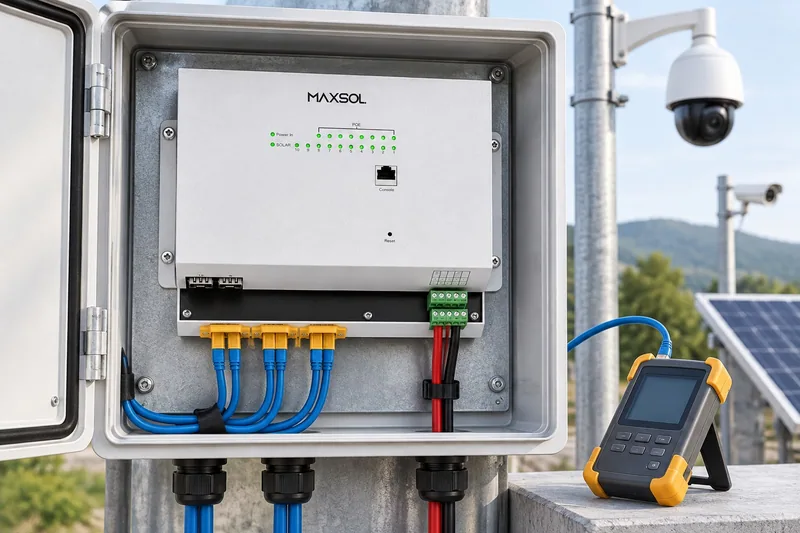
Outdoor PoE Power Checklist for UK Integrators
A practical outdoor PoE checklist covering power budgets, voltage drop, protection, enclosures, uplinks, testing and commissioning evidence.
By Maxsol Team

A reliable outdoor PoE installation starts with a complete power path, not simply a switch wattage. Installers should identify every source, converter, protective device, cable run and load, then confirm that voltage and power remain within the documented limits during start-up, normal operation and recovery from a fault.
This outdoor PoE power installer system integrator checklist covers the decisions that matter in the field: source voltage, PoE demand, voltage drop, environmental control, surge protection, uplinks, monitoring, service isolation and commissioning records. It applies to both grid-fed equipment and solar-oriented DC systems, but compatibility must always be verified at interface level.
Map power sources, loads, converters and interfaces
Begin with a one-line system diagram showing how energy and data travel through the installation. The diagram should be detailed enough for another engineer to identify every conversion stage and isolation point without opening each enclosure.
Record the following:
- Grid, photovoltaic, battery or hybrid power source
- Nominal and permitted source-voltage range
- AC-to-DC and DC-to-DC conversion stages
- Battery charge controller or UPS function
- PoE switch, injector or converter input range
- PoE output voltage, pinout and negotiation method
- Number and type of powered devices
- Copper and fibre uplinks
- Cable lengths and conductor specifications
- Branch protection, surge protection and isolation
- Earthing and bonding connections
- Monitoring and alarm interfaces
Do not assume that two products are compatible merely because both mention 24V, 48V or PoE. A nominal voltage is only one part of the interface. Polarity, permitted voltage range, current capacity, pin assignment, power negotiation and fault behaviour must also agree.
Grid-fed integrated equipment versus solar-oriented DC equipment
Grid-fed and solar-oriented systems solve different design problems. An integrated AC-fed outdoor unit can reduce the number of separate components, while a DC-oriented arrangement can provide greater control over photovoltaic, battery and conversion stages.
| Design question | Grid-fed integrated equipment | Solar-oriented DC equipment |
|---|---|---|
| Primary source | Usually an AC supply | Photovoltaic panels, batteries or another DC source |
| Main design concern | AC protection, earthing, UPS behaviour and enclosure environment | Battery voltage range, solar charging, autonomy and conversion efficiency |
| Conversion stages | Often integrated within the enclosure | May include separate charge, battery and PoE conversion stages |
| PoE output | Confirm total budget, per-port limits and negotiation | Confirm voltage, port mode, total budget and battery-side current |
| Recovery behaviour | Test after AC loss, UPS discharge and mains restoration | Test low battery, solar return, controller restart and cold-load start-up |
| Service isolation | Isolate AC and any internal stored energy | Isolate PV, battery and load branches separately |
| Key limitation | Integration does not remove the need for load calculations | A matching nominal DC voltage does not prove interface compatibility |
For example, the SBOX2802SFG-I managed industrial smart Ethernet box is documented as an IP65 unit combining eight Gigabit PoE ports, two Gigabit SFP slots, Layer 2 management, an AC100-240V input and a built-in 240W DC55V UPS module. Those facts make it an example of an integrated, grid-fed design layer; they do not establish suitability for every powered device, battery strategy or site environment.
The IOT2802SFG-S managed solar industrial PoE switch illustrates a DC and solar-oriented approach. Its documented features include eight Gigabit PoE ports, two SFP ports, a 120W PoE budget, 90W BT support, PV and battery monitoring, and PV and battery input at DC22-29.2V. Ports 3–4 can be configured for 24V or 48V PoE. The selected mode must match the connected equipment; it should not be treated as universal PoE compatibility.
For a broader view of how supply, switching, fibre, batteries and outdoor housings fit together, use this outdoor PoE switch box, power, fibre and battery guide alongside the site schematic.
Check per-port demand, total budget and voltage drop
A switch can have enough total wattage yet still be unsuitable for an individual high-power device. Conversely, every port may be within its limit while the combined demand exceeds the switch or upstream supply capacity.
Create a load schedule with one row for every powered device:
| Load item | Port | Normal demand | Start-up or peak demand | Required PoE mode | Cable length | Criticality |
|---|---|---|---|---|---|---|
| Camera or sensor | ||||||
| Wireless access point | ||||||
| Radio or CPE bridge | ||||||
| Auxiliary device |
Use manufacturer-documented maximum or peak input figures rather than estimating from typical consumption. Motorised cameras, heaters, infrared illumination, radios and equipment starting simultaneously can create demand that is not obvious during light bench operation.
Check each of these limits separately:
- Maximum demand of each powered device
- Permitted output of the assigned PoE port
- Combined PoE budget of the switch
- Output capacity of any DC converter
- Input current required from the source
- Battery discharge and charge-controller limits
- Cable loss between each stage
- A project-defined engineering margin
Do not count a PoE budget twice. If a unit documents a 120W total budget, that budget must cover the combined applicable port load; it is not automatically available to every port.
Calculate voltage drop through the full circuit
Voltage drop should be assessed at the worst expected current, using the cable manufacturer’s conductor resistance and the complete electrical path. For a basic DC circuit:
Voltage drop = circuit current × total loop resistance
The receiving equipment must remain within its permitted input range after this drop. Also check the source at both its highest and lowest operating voltage. This is particularly important for batteries because terminal voltage changes with state of charge, load and charging condition.
Factors affecting the calculation include:
- Cable conductor size and material
- Total out-and-back path
- Connector and terminal resistance
- Ambient and enclosure temperature
- Corrosion or poor termination
- DC converter efficiency
- Start-up current
- Voltage variation at the source
Higher distribution voltage often reduces current and therefore cable loss for a given power level, but it does not automatically make a system compatible. The 12V, 24V and 48V solar surveillance power guide explains the trade-offs when selecting a DC architecture.
A local converter may be appropriate where a site supply does not directly match the required output. The POE24V adjustable DC-to-PoE converter accepts 12-36V DC and provides an adjustable 12-57V PoE output, Gigabit Ethernet and an LCD voltage display. Its documented continuous load for 12V-to-48V conversion is no more than 30W. IEEE PoE negotiation is not established by those converter facts, so voltage, polarity, pinout and device acceptance must be confirmed before connection.
Specify enclosure, thermal, moisture and surge controls
An outdoor enclosure needs more than an ingress rating. The complete installation includes cable glands, vents, seals, mounting holes, connectors and workmanship, all of which affect environmental protection.
Document the expected conditions:
- Minimum and maximum ambient temperature
- Direct solar exposure
- Wind-driven rain
- Condensation risk
- Coastal salt or industrial contamination
- Flooding or standing-water risk
- Insects and vermin
- Vibration and impact
- Maintenance access
- Heat produced by internal equipment
Control heat without introducing moisture
Calculate or obtain the heat dissipation of internal power supplies, converters, switches, batteries and protective devices. Solar gain can raise the internal temperature even when the outdoor air remains moderate.
Possible controls include enclosure shading, suitable spacing, passive heat paths, thermostatically controlled ventilation or another engineered thermal arrangement. Any opening or ventilation method must be considered as part of the enclosure’s overall moisture and contamination strategy.
Condensation can occur when humid air enters an enclosure and internal surfaces fall below the dew point. Avoid relying on a sealed box alone. Consider cable-entry orientation, drainage, pressure equalisation, internal air volume and the temperature cycle between day and night.
Coordinate surge, branch protection and grounding
Outdoor data and power cabling can introduce surge energy from nearby electrical activity, long cable runs and differences in earth potential. Protection should be coordinated rather than added as isolated components.
The design should identify:
- Protection at the source
- Protection where external cables enter equipment zones
- Separate protection for relevant power and data paths
- Branch protection for individual circuits
- Protective earth conductors
- Functional earth or screen connections where required
- Bonding between metallic enclosures and structures
- The relationship to any site lightning protection system
Keep protective earth, DC negative, cable screen and signal reference distinct on drawings unless the equipment documentation specifies a connection. Unplanned bonding can create circulating currents or unsafe fault paths.
Protection devices also require a suitable path to earth. Excessively long or poorly routed conductors can reduce their effectiveness. Confirm conductor routing, terminal torque and replacement access as part of installation inspection.
Plan uplinks, monitoring and service isolation
The power design and network design must be reviewed together. A powered camera is not useful if its uplink becomes unavailable when the same fault occurs.
Select the appropriate uplink
Copper uplinks may be convenient for short, controlled routes, but they can extend conductive paths between buildings or outdoor structures. Fibre can provide electrical separation and support longer site layouts, although transceiver type, fibre type, connector format and optical budget must all be matched.
For each uplink, record:
- Copper or fibre medium
- Required data rate
- SFP or interface type
- Fibre mode and core count, where applicable
- Connector type
- Link distance
- Redundancy requirement
- VLAN and management configuration
- Cable route and physical protection
Do not assume that all SFP modules operate in every SFP slot. Confirm the switch documentation and the complete optical pair.
Decide what needs to be monitored
Useful monitoring can include:
- Port link status
- PoE status or output condition
- Total power use
- Source voltage
- Battery voltage
- Photovoltaic input
- Internal temperature
- Uplink loss
- Device restart events
- Low-voltage or fault alarms
Monitoring is most valuable when the team defines who receives an alarm and what action it should trigger. A dashboard without thresholds, ownership or escalation does not form a maintenance process.
Provide safe service isolation
Engineers should be able to make one part of the system safe without unnecessarily shutting down the entire site. Label and document isolation for:
- Incoming AC supply
- Photovoltaic input
- Battery connection
- DC load output
- Individual protected branches
- PoE outputs where independent control is available
- UPS or other stored-energy sources
A switch inside an enclosure may remain energised from a battery after the AC feed is isolated. Likewise, photovoltaic conductors can remain live when downstream equipment is switched off. The handover information must state every source of stored or independently generated energy.
Bench-test start-up, faults and recovery
Bench testing should reproduce likely site conditions before equipment is mounted at height or installed at a remote location. Test the actual configuration where practical, including representative loads, converters, uplinks and management settings.
A structured test sequence should include:
- Visual and polarity check: Inspect terminals, pinouts, protection orientation and cable identification before energising.
- No-load power-up: Confirm source and converter output voltages before connecting powered devices.
- Single-port start-up: Connect one device at a time and verify correct detection, voltage and network operation.
- Full planned load: Run all expected devices together and check total demand.
- Simultaneous start: Restart the complete system to expose start-up peaks or sequencing problems.
- Minimum source voltage: Confirm behaviour at the lowest permitted input condition without going outside equipment limits.
- Uplink interruption: Disconnect and restore the data uplink, then verify reconnection and management visibility.
- Source failure: Simulate loss of the primary supply and observe UPS or battery operation where applicable.
- Low-energy shutdown: Verify controlled behaviour when the battery or source reaches its configured limit.
- Power restoration: Confirm automatic recovery, correct port states and return of connected devices.
- Individual branch fault: Test whether one protected branch can fail without disabling unrelated loads.
- Configuration retention: Confirm that VLANs, port settings, PoE modes and monitoring parameters survive restart.
Do not deliberately create unsafe short circuits or exceed documented equipment limits. Use suitable test methods and follow the product and protective-device instructions.
Common commissioning failures include configuring the wrong passive PoE voltage, reversing DC polarity, overlooking a second power source, exceeding a converter limit during start-up, and assuming that a powered device has recovered because the switch port shows a link. Verify application-level operation as well as electrical and Ethernet status.
Record commissioning evidence for handover
A commissioning pack should allow the operator or a future service engineer to understand what was installed, why settings were selected and how the system behaved during testing.
Include:
- Final one-line power and data diagram
- Equipment schedule with model and serial details
- Current product datasheets
- Port-to-device schedule
- Per-port and total load calculations
- Cable types, lengths and routes
- Voltage-drop calculations
- Converter settings and measured outputs
- PoE modes and port configuration
- Protection-device schedule
- Earthing and bonding record
- Enclosure and gland inspection
- Network addressing, VLANs and uplink details
- Monitoring thresholds and alarm recipients
- Photographs of wiring, labels and enclosure layout
- Bench and site test results
- Fault and recovery observations
- Isolation procedure
- Configuration backup and revision date
- Known limitations or reserved capacity
Record measurements with the operating condition that produced them. A voltage reading is more useful when the document states whether it was measured with no load, normal load or all devices starting.
The handover should also identify settings that must not be changed without repeating compatibility checks. These may include passive PoE voltage, converter output, battery thresholds, port power modes and grounding arrangements.
Final installer checklist
Before accepting an outdoor PoE system, confirm that:
- Every source and conversion stage appears on the drawing.
- Input-voltage ranges remain valid under all intended operating conditions.
- Polarity, pinout and PoE method match each connected device.
- Every port can support its assigned peak load.
- Combined demand remains within the documented PoE budget.
- Upstream converters, supplies and batteries can support the resulting current.
- Voltage drop has been calculated for the full cable path.
- Thermal and condensation risks have been addressed.
- Cable entries preserve the intended environmental protection.
- Surge protection, branch protection, earthing and bonding are coordinated.
- Copper or fibre uplinks have been specified end to end.
- Monitoring has defined thresholds, recipients and actions.
- All power sources and stored energy can be safely isolated.
- Start-up, source loss, low-energy shutdown and recovery have been tested.
- Configuration files, readings, photographs and diagrams are included in the handover.
The SBOX2802SFG-I, IOT2802SFG-S and POE24V represent different design layers and are not presented as a tested compatible system. Before selecting or combining equipment, compare the current datasheets against the required port count, load, cable distance, source voltage, environment and management functions. Verify voltage, polarity, pinout, protocol and protection at every interface.